
Animated Controls1.2 - Google Play
You'll be able to see results in few seconds.
Publisher Description
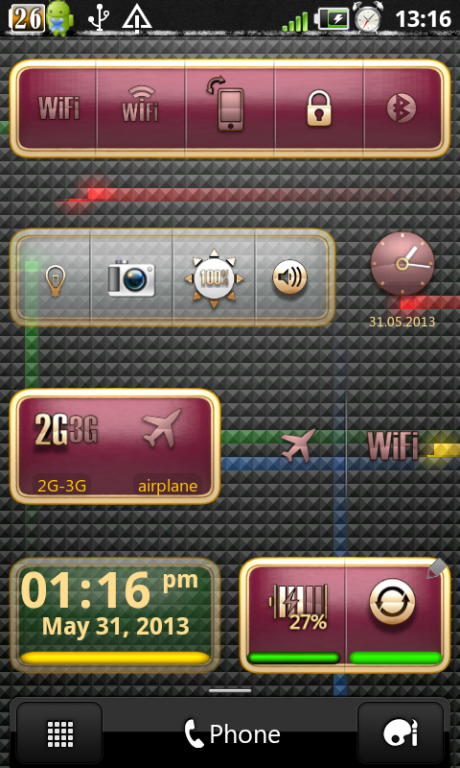
"Animated Controls" - the only ANIMATED HOME SCREEN WIDGET for your customized home screen. You have access to over 20 toggles + additional action on double-clicking for each toggle.
Choose one of themes, transparency, labels and indicators color, clock format and font... - beautify your smartphone! PROCESS OF SWITCHING IS ANIMATED! SUPPORT DOUBLE-CLICK ACTION!
!!!!!!!!!!!
CAN`T UNINSTALL APPLICATION FROM SMARTPHONE:
Because “Animated Switcher” was registered as telephone administrator (THIS IS FOR LOCK SCREEN BUTTON). Try to open smartphone settings: Menu -> Settings -> Security -> Select device administrators. When uncheck “Animated Switcher”. Now, you can uninstall the application.
!!!!!!!!!!!
IMPORTANT NOTE: FROM ANDROID 3.0 SOME DEVICES NEED TO BE REBOOTED AFTER INSTALLATION OF THE WIDGET BEFORE YOU CAN SEE IT IN THE WIDGET`S LIST.
Features:
Process of switching is animated
Several different backgrounds
Widget transparency
Customized color and visibility of indicators and labels
Customized visibility of buttons dividers
Remove widgets size from the list of widgets
Save and load your custom profiles
Action on double-clicking!
and many other
Available switches / double click action
- 2G-3G / mobile network settings
- Airplane Mode / network settings
- Bluetooth / Bluetooth settings
- Brightness / display settings
- GPS / location settings
- Ringer / sound settings
- Application manager
- Auto-rotate screen / display settings
- Wifi / Wifi settings
- Auto-sync / syncronization settings
- Switch APN * / APN settings
- Battery indicator / hidden system menu
- 4G ** / mobile network settings
- Volume control
- Application shortcuts
- Clock / Alarm clock
- Flashlight ** (tested and works on the HTC Legend, HTC Desire bravo 2.3.3, Motorola xoom)
- Lock screen / security settings
- Contact (call, SMS or e-mail)
- Wifi Access Point
- Screen dim timeout
- Mount disk
- USB Access Point
* This function depends on the phone manufacturer and Android OS version updates
** First, widget try to direct switching of 3g-4g mode. If your phone does`t support direct switching, widget try to open hidden form of 4g settings. If your phone does`t support that form, widget open Mobile network settings page.
Keywords: on, off, on-off, animated, switcher, controls, screen widget, tools, control, switches, toogle, toggles, animated controls, animated switchers, On/Off Animated Switchers
About Animated Controls
The company that develops Animated Controls is alonedroid. The latest version released by its developer is 1.2.
To install Animated Controls on your Android device, just click the green Continue To App button above to start the installation process. The app is listed on our website since 2013-11-08 and was downloaded 0 times. We have already checked if the download link is safe, however for your own protection we recommend that you scan the downloaded app with your antivirus. Your antivirus may detect the Animated Controls as malware as malware if the download link to com.alonedroid.ooswitcher.metal is broken.
How to install Animated Controls on your Android device:
- Click on the Continue To App button on our website. This will redirect you to Google Play.
- Once the Animated Controls is shown in the Google Play listing of your Android device, you can start its download and installation. Tap on the Install button located below the search bar and to the right of the app icon.
- A pop-up window with the permissions required by Animated Controls will be shown. Click on Accept to continue the process.
- Animated Controls will be downloaded onto your device, displaying a progress. Once the download completes, the installation will start and you'll get a notification after the installation is finished.
Program Details
System requirements
Download information
Pricing
Version History
version 1.2
posted on 2013-11-08
Fix bugs,2g-3g toggle icon changed to g-3g,2g-3g action changed to open mobile network settings (to activate/deactivate mobile network use Apn toggle),add tree different sizes to edit button,Redraw all icons and themes for full HD,Update indicators position for all themes
version 1.1.1
posted on 2013-06-28
Several fixes and updates
Disclaimer
Official Google Play Link
We do not host Animated Controls on our servers. We did not scan it for viruses, adware, spyware or other type of malware. This app is hosted by Google and passed their terms and conditions to be listed there. We recommend caution when installing it.
The Google Play link for Animated Controls is provided to you by apps112.com without any warranties, representations or guarantees of any kind, so access it at your own risk.
If you have questions regarding this particular app contact the publisher directly. For questions about the functionalities of apps112.com contact us.
